
A biometric attendance machine records when each employee starts and finishes work by verifying something they cannot lend to a colleague: a fingerprint, a face or a palm. For UAE businesses in Dubai, Abu Dhabi, Sharjah and the northern emirates, the right machine depends less on the brochure and more on four things: how many people arrive at once, where the terminal will sit, what your staff do with their hands all day, and how attendance data reaches payroll.
This guide explains how the technology works, compares each method and maps the ZKTeco models we stock to the jobs they suit.
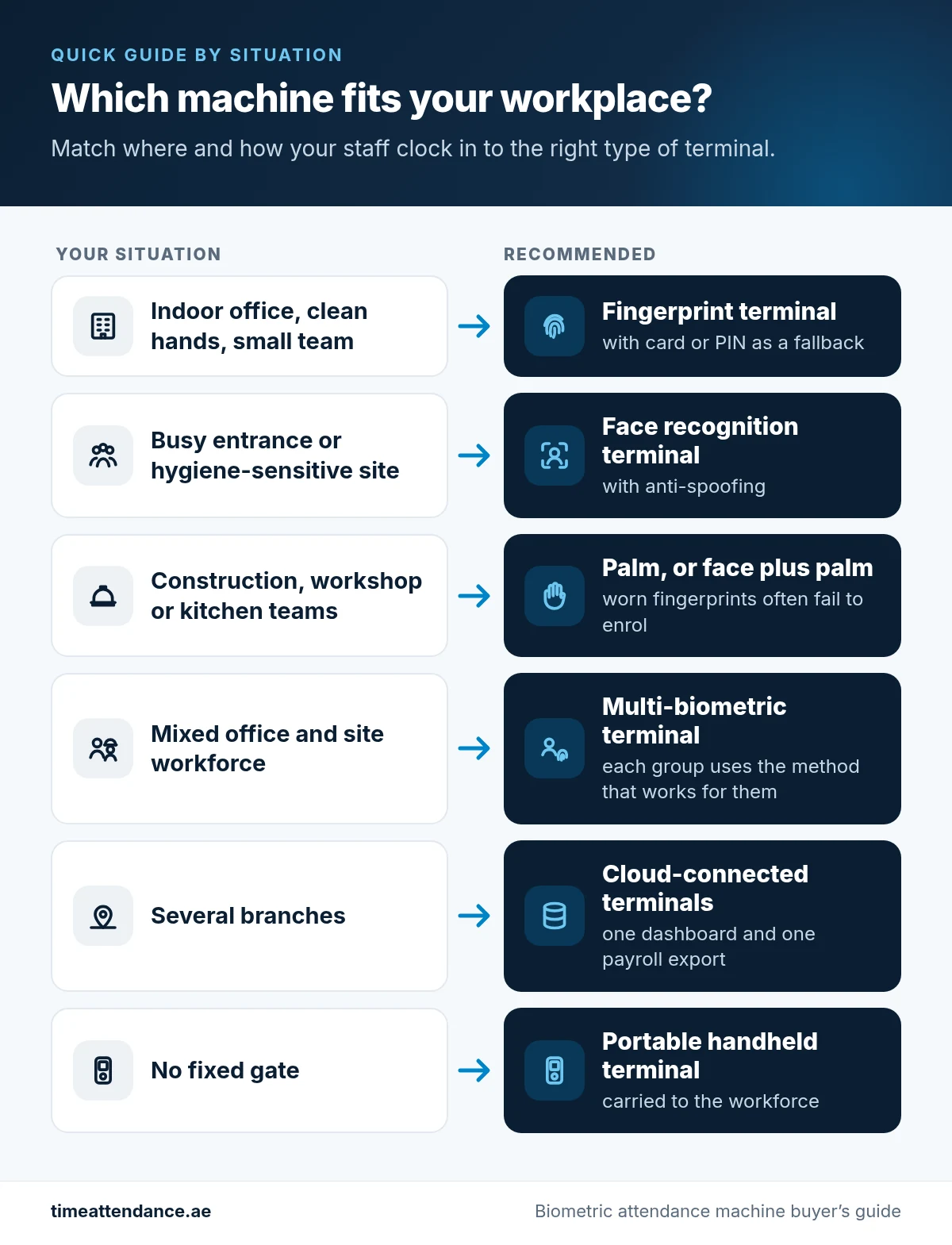
Quick guide by situation
- Indoor office, clean hands, small team: a fingerprint terminal with card or PIN as a fallback.
- Busy entrance or hygiene-sensitive site: a face recognition terminal with anti-spoofing.
- Construction, workshop or kitchen teams: palm, or face plus palm, because worn fingerprints often fail to enrol.
- Mixed office and site workforce: a multi-biometric terminal, so each group uses the method that works for them.
- Several branches: cloud-connected terminals that report into one dashboard and one payroll export.
- No fixed gate: a portable handheld terminal carried to the workforce.
In this guide
How a Biometric Attendance Machine Works
Every biometric terminal follows the same five steps, whichever method it uses.
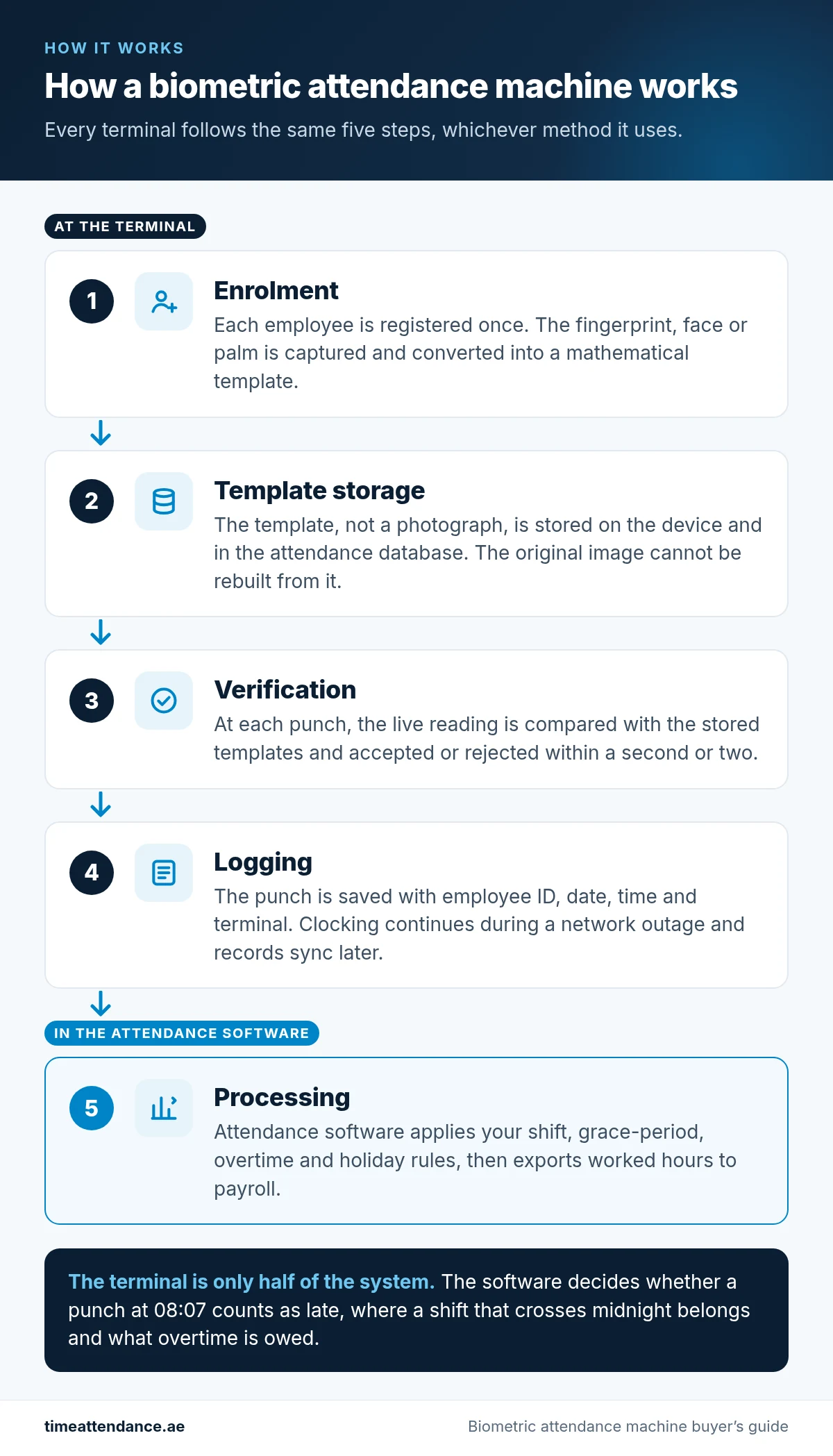
- Enrolment. Each employee is registered once. The terminal captures the fingerprint, face or palm and converts it into a mathematical template.
- Template storage. The template, not a photograph, is stored on the device and in the attendance database. The original image cannot be rebuilt from it.
- Verification. At each punch the terminal compares the live reading with the stored templates and accepts or rejects it within a second or two.
- Logging. The accepted punch is saved with the employee ID, date, time and terminal. Because matching happens on the device, clocking continues during a network outage and the records sync when the connection returns.
- Processing. Attendance software applies your shift, grace-period, overtime and holiday rules, then exports worked hours to payroll.
The terminal is only half of the system. The software decides whether a punch at 08:07 counts as late, where a shift that crosses midnight belongs and what overtime is owed. Our time attendance software page explains how that part works.
Types of Biometric Attendance Machines
Fingerprint
Fingerprint is the most widely deployed method and usually the lowest cost per user. The employee places a finger on a sensor and the terminal matches the ridge pattern. It works well in offices, retail units and clinics. Its weakness is manual work: cement, oil and abrasion wear ridges down, and some employees never enrol cleanly. Most fingerprint models also accept a card or PIN as a fallback. Browse fingerprint time attendance machines.
Face recognition
Face recognition is contactless and fast at a busy door, because employees are verified as they approach rather than stopping to place a finger. Choose a model with anti-spoofing that rejects printed photos and video replay, and check the mounting position: strong sunlight behind the employee in a glass-fronted lobby is where basic face terminals struggle. Browse face recognition attendance machines.
Palm recognition
Palm terminals read the hand without contact and are not affected by worn, dirty or damp fingertips. Palm is the method to specify when fingerprint has already been tried on a construction or industrial workforce and is causing daily exceptions. In a clean office it is rarely worth the extra cost over fingerprint or face. Browse palm recognition attendance machines.
Card and RFID
Proximity cards and key fobs are quick, contactless and useful for visitors, contractors and short-term staff. On their own they do not stop buddy punching, because a card can be handed to a colleague. That is why cards normally supplement biometrics rather than replace them. See RFID cards and card and RFID attendance machines.
Multi-biometric terminals
Multi-biometric terminals combine face with fingerprint, or face with palm, on one device. Office and site staff can each use whatever enrols reliably, without two devices at one door. Several models also support multi-factor combinations, such as face plus card, for higher-security doors.
Cloud-connected and portable terminals
Cloud-connected terminals report every branch into one dashboard and one payroll export, and buffer punches locally if the connection drops. Portable handheld terminals are carried to the workforce on sites with no fixed gate. Browse cloud-based time attendance and multi-location time attendance.
How to Choose the Right Biometric Attendance Machine
Answer these eight questions before comparing models.
1. Headcount and peak arrival rate
Two numbers matter: how many employee templates the terminal must store, and how many people pass it in your busiest ten minutes. Throughput is usually the limit you hit first. If several hundred staff arrive at shift change, plan for fast face or face-and-palm terminals, or more than one terminal per entrance. Ask for each model’s user and template capacity from the manufacturer datasheet before you buy.
2. Number of sites
A single office can run on one standalone or networked terminal. With two or more branches, or project sites that open and close, cloud-connected terminals give you one database, one set of rules and one payroll export instead of a file per location.
3. Indoor or outdoor position
Indoor terminals are not built for direct sun, sand, rain or dust. If the reader will sit at a site gate or an unsheltered entrance, ask for a model with a suitable ingress protection (IP) rating, a protective housing or a sheltered mounting point.
4. Workforce and hygiene
Look honestly at your staff’s hands. Office teams enrol fingerprints easily; construction, workshop, cleaning and kitchen teams often do not. Healthcare, food handling and any site where staff wear gloves favour contactless face or palm. If staff routinely wear face coverings, raise it at the survey stage.
5. UAE labour records, overtime and WPS
Under Federal Decree-Law No. 33 of 2021, normal private-sector working hours are capped at 8 hours a day or 48 hours a week, overtime is generally limited to two hours a day and paid at a premium, and working hours are reduced by two hours a day during Ramadan. Your attendance records are the evidence behind every overtime payment and deduction.
The terminal captures punches, the attendance software turns them into hours and overtime, and your payroll system uses those figures to produce the salary file sent through the Wage Protection System (WPS). Choose software that can apply UAE overtime, rest-day, public holiday and Ramadan rules, and that keeps an audit trail of every manual edit.
6. Integration with attendance and payroll software
Confirm before purchase that the terminal works with the attendance software you plan to run, and how data will reach your payroll, HR or ERP system: a scheduled export, an API or a direct integration. If you already own terminals, check the model numbers, because some older devices only work with their own vendor’s software.
7. Cloud or on-premise software
- Cloud: lower upfront cost on a subscription, straightforward multi-branch reporting and access from a browser or phone, with the data hosted by the provider.
- On-premise: a licence plus your own server, data entirely under your control, and the local network keeps working during an internet outage; multi-branch use needs a VPN or site-to-site link.
Multi-site groups with lean IT usually lean to cloud. A single large site with strict data policies often prefers on-premise. Either way, confirm where the data is hosted before you sign.
8. Access control and data protection
Most terminals can also release a door lock or turnstile, so one enrolment covers both attendance and access. Biometric data is personal data: the UAE has a federal Personal Data Protection Law (Federal Decree-Law No. 45 of 2021), and DIFC and ADGM have their own data protection regimes. Tell employees in writing what is collected and why, restrict who can access it, and take legal advice on retention periods if your sector has specific rules.
ZKTeco Biometric Attendance Machines Compared
We supply genuine ZKTeco terminals. The table groups representative models from our catalogue by verification method and typical fit. It is a shortlist, not a specification sheet: ask us for the manufacturer datasheet for the capacity, connectivity and dimensions of any model.
| Model | Verification | Best suited to |
|---|---|---|
| ZKTeco K40 Pro | Fingerprint, card, PIN | Indoor office clocking at a low cost per user |
| ZKTeco UA300 Pro | Fingerprint, card | Offices that have outgrown a basic clock |
| ZKTeco F18 | Fingerprint, card | Attendance plus single-door access control |
| ZKTeco iClock880 | Fingerprint | One terminal carrying a larger headcount |
| ZKTeco BioFace A1 | Face | Offices moving from fingerprint to contactless |
| ZKTeco SenseFace 4 | Face | Higher-traffic entrances |
| ZKTeco iFace880 | Face, fingerprint | Mixed office and site workforces |
| ZKTeco BioPro SA40 | Face, fingerprint | Different assurance levels on different doors |
| ZKTeco ProFace X | Face, palm | Gates where several hundred people arrive at once |
| ZKTeco SpeedFace V5L | Face, palm, cloud-connected | Companies with more than one branch |
| ZKTeco P999 Palm ID | Palm | Industrial teams with fingerprint enrolment failures |
| ZKTeco Horus | Face, cloud-connected | Branch chains reporting into one dashboard |
| ZKTeco Horus E1 | Face, cloud-connected, portable | Projects, events and temporary gates |
| ZKTeco S922 | Fingerprint, handheld | Sites with no fixed gate and roaming teams |
Larger sites often mix methods: face or palm at the main gate, fingerprint on internal doors and cards for visitors, all in one attendance database. See all biometric time attendance hardware or browse the time attendance shop.
Implementation Tips for a Smooth Rollout
- Survey before you specify. Check each entrance for lighting, sun exposure, power, network cabling and where the queue forms at shift change.
- Write your attendance rules down first. Shift times, grace periods, whether early arrival earns overtime, rest-day and public holiday pay, night shifts that cross midnight, and what happens when someone forgets to clock out.
- Pilot with a real group. Enrol a mix of office and site staff, check how many enrol cleanly, and run one pay period in parallel with your current method.
- Plan for enrolment failures. Enrol a second finger, add face or palm, or issue cards to the employees who cannot enrol reliably.
- Tell staff what you collect and why. A short written notice reduces resistance and supports your data protection obligations.
- Test the payroll export end to end. Run real data, including overtime, late arrivals and absences, through to your payroll system before go-live.
- Agree ongoing support. Decide who enrols new joiners, removes leavers, applies firmware updates and holds spare units, and whether you want an annual maintenance contract.
Biometric Attendance Machine FAQs
What is the best biometric attendance machine for a UAE office?
For a typical indoor office, a fingerprint terminal with card or PIN fallback is usually the most cost-effective choice. If you want contactless clocking or have a busy entrance, a face recognition terminal with anti-spoofing is the next step up.
Is fingerprint or face recognition better for attendance?
Neither wins everywhere. Fingerprint is the lower-cost option for clean indoor offices, while face recognition is faster at busy doors, contactless and unaffected by worn hands. Many UAE businesses choose a multi-biometric terminal that offers both.
Do biometric attendance machines work for construction workers?
Yes, if you choose the method carefully. Worn or damaged fingertips often fail fingerprint enrolment, so face, palm or face-and-palm terminals are the better fit, with outdoor protection wherever the terminal faces sun and dust.
Can attendance data be used for WPS payroll?
Attendance data feeds payroll rather than WPS directly. The attendance software calculates worked hours, overtime and deductions, and your payroll system uses those figures to produce the salary file submitted through the Wage Protection System.
Do biometric attendance machines work without internet?
Yes. Matching happens on the terminal, punches are stored in its memory and records sync to the software when the connection returns. Only live dashboards and remote enrolment need connectivity.
Is it legal to use biometric attendance in the UAE?
Biometric attendance is widely used by UAE employers. Terminals store a mathematical template rather than an image, but it is still personal data, so tell employees what is collected and why, limit access and take legal advice on retention, particularly in DIFC or ADGM.
Can one system cover several branches?
Yes. Each branch needs its own terminal, but cloud-connected terminals can report every location into a single dashboard and payroll export.
Can I connect my existing attendance machines to new software?
Often, yes. It depends on the make, model and firmware, because some older terminals only work with their own vendor’s software. Send us the model numbers and we will confirm compatibility before you buy.
Get a Biometric Attendance Machine Quote
Tell us your headcount, how many entrances and sites you run, and what your staff do all day. We will recommend fingerprint, face, palm or a mix, and tell you plainly if you do not need the expensive option.
- Request a quote: send us your requirements
- WhatsApp: +971 52 899 9169
- Email: sales@etopme.ae
- Dubai: +971 4 455 9007
- Abu Dhabi: +971 2 650 3433
4 Responses